Notsify · Case study · 3 min read
Notsify
A privacy-first notes app built for one job: getting a thought out of your head and filed in under five seconds.
Notsify is a self-initiated product, designed and built end to end, and running on Vercel.
- Client
- Notsify
- Year
- 2025
- Role
- Product designer & front-end developer
- Duration
- 4 Weeks
- Industry
- Productivity, Notes
- Tools
- React, Vite, Tailwind, Vercel
- Product design
- Front-end development
- Interaction design
At a glance
Challenge
Most note apps are archives first and capture tools second. You open them to write something, and instead you are asked to choose a folder, name a file, pick a format and stare at a sidebar of things you wrote last month. The cost of capturing a thought goes up, so fewer thoughts get captured.
Solution
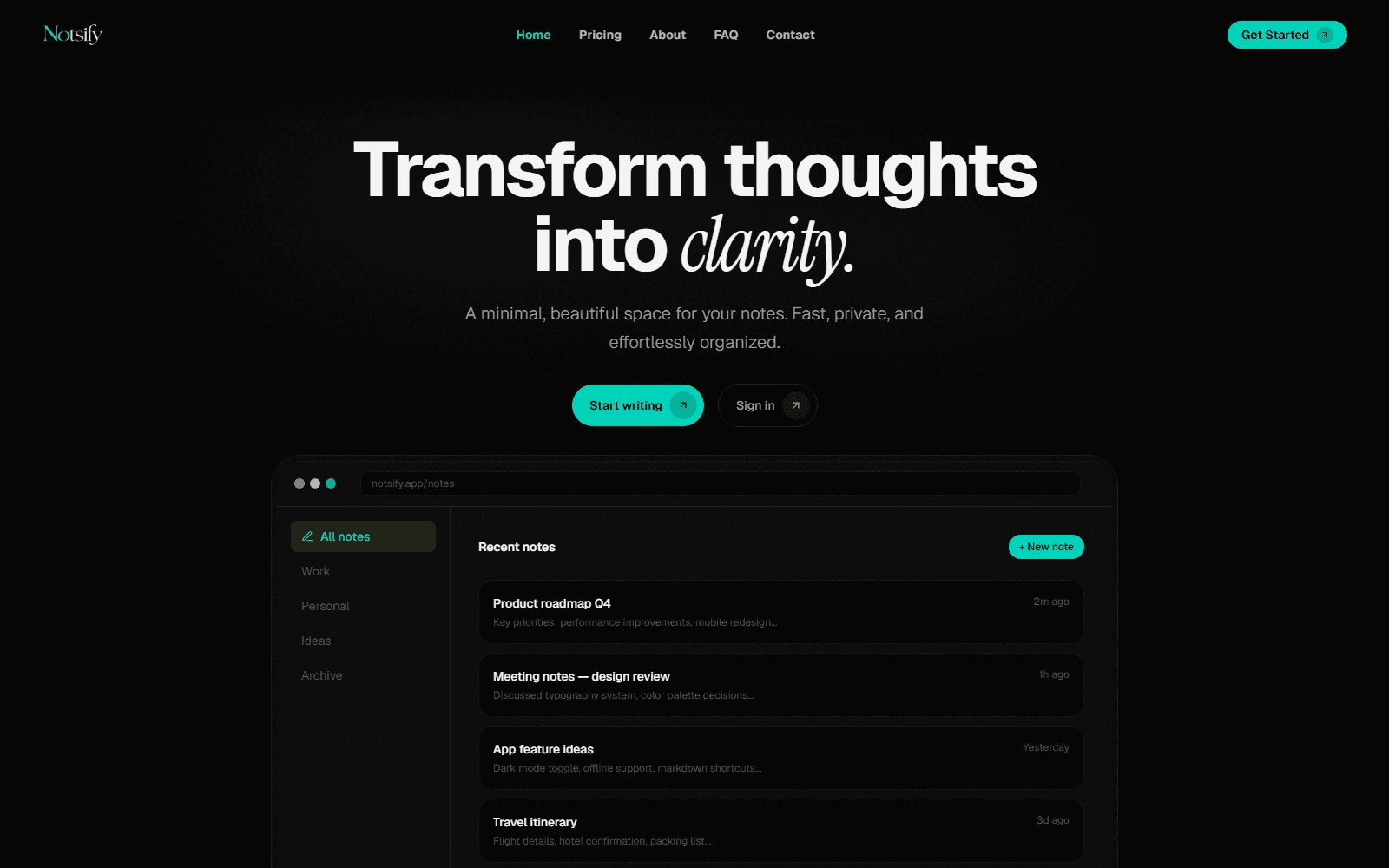
Notsify inverts the priority. The editor is the first screen and always ready, with no modal, no naming ceremony and no toolbar competing for attention. Notes land in a workspace automatically, the dashboard surfaces what you touched last, and the archive keeps what is out of the way without being out of reach.
Outcome
A focused, fast product with a keyboard-first editor, workspace organisation and a recent-notes dashboard, deployed on Vercel as a static front-end with local persistence.
Deliverables
- Distraction-free editor with autosave
- Workspace and archive organisation
- Recent-notes dashboard
- Keyboard-first command flow
- Responsive, installable front-end
Overview
Notsify is a notes app for people who think in fragments — engineers, researchers, students, anyone who has a good idea while walking somewhere and wants it in writing before it evaporates.
The whole product is one bet: capture must be faster than thought. Everything in the interface is subordinate to that.
The challenge
- Open to a blank editor in one action, always
- File a note without a naming or folder decision
- Keep the archive out of the way but never lost
- Make the recent list the fastest way back in
- Respect the user's data by default
Approach
1. The editor is the home screen
There is no dashboard-first layout. The app opens in the editor with the caret already blinking, because the fastest possible path from “I have a thought” to “it is written” is zero clicks.
2. Workspaces instead of folders
Work, Personal, Ideas, Archive. Four destinations, no nested trees, no tags to invent. A note is filed by context, not by taxonomy — the classification cost is paid once, by the person who built the system, not by the person typing.
3. Recent is the real index
A dashboard of what you touched last, with the note preview inline. It is the difference between remembering where something is and not having to.
The solution
A React and Tailwind application with a deliberately small surface area. Autosave means there is no save button to think about, keyboard shortcuts cover navigation, and the interface stays visually quiet — one typeface scale, a single accent, and a lot of empty space.
Results
Notsify runs on Vercel. The editor-to-note path is a single keystroke, the recent-notes dashboard is the most-used surface after writing, and the archive keeps older work available without competing for attention.
Key takeaways
Reducing friction is not the same as removing features. Notsify has fewer concepts than a typical notes app and more depth in each one — that is the trade that makes it fast.
Defaults are a product decision. Choosing the workspace, the file name and the save timing means the person writing never has to make a decision they did not come to make.
I stopped keeping a notes app open all day just in case. Now I open it when the thought arrives, type it, and it is filed. The archive can be chaotic because the capture never is.
FAQ
How does Notsify stay private?
The app keeps the whole product surface on the front-end, stores notes locally, and does not require an account to start writing. Nothing leaves the device unless the user exports it.
What are workspaces?
Work, Personal, Ideas and Archive. Notes are filed into one of them automatically, so you never have to decide where something belongs while you are in the middle of writing it.
Can I find old notes?
The dashboard lists what you touched most recently with a preview, and the archive keeps everything older organised by workspace rather than by a folder tree.
Have a project in mind?
I design and build production websites, platforms and documentation — from the first wireframe to a live deployment.
Linux with Nomii
Explore case study