Cinesearch · Case study · 3 min read
Cinesearch
A poster search engine over the OMDb database, built for the moment you half-remember a film and need to find it in two keystrokes.
Cinesearch is a self-initiated project, built and deployed on Netlify as a static front-end.
- Client
- Cinesearch
- Year
- 2024
- Role
- Front-end developer
- Duration
- 2 Weeks
- Industry
- Entertainment, Media discovery
- Tools
- React, Tailwind, OMDb API, Netlify
- Front-end development
- API integration
- UI design
At a glance
Challenge
The OMDb API is small and clean, which makes it a trap: the demo you build in an hour searches titles and shows a grid. The interesting problems are the ones after that — what happens on a slow response, how do you filter a huge result set without a backend, and what does an empty search actually look like.
Solution
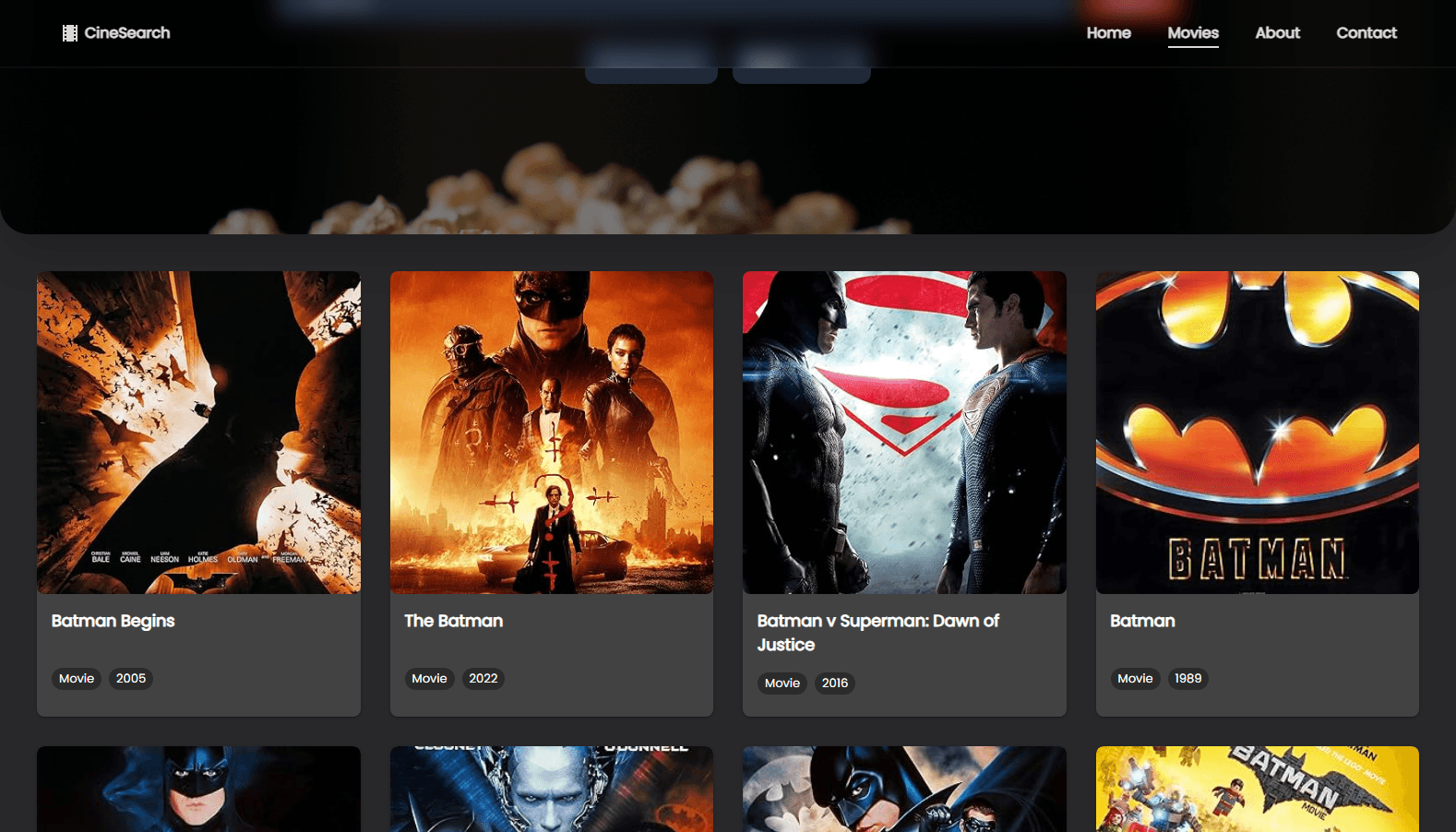
A React front-end that treats the API as a search index rather than a lookup table. Title, year and type filters compose into a single query, results render as a dense responsive poster grid, and every state the request can be in — loading, empty, error, rate-limited — has a designed screen.
Outcome
A fast, dependency-light search front-end with debounced querying, graceful API states and a poster grid that stays readable from a phone to an ultrawide.
Deliverables
- Debounced live title search
- Composable year and type filters
- Responsive poster grid with rich metadata
- Designed loading, empty and error states
- Static deployment with instant cold start
Overview
Cinesearch is a front-end exercise with a real constraint: the entire catalogue comes from OMDb over HTTP, with no server of my own and no database. Everything the product does has to be derived from what the API is willing to give back.
That constraint is what makes it interesting — it is a complete search experience assembled from a single public endpoint.
The challenge
- Query on every keystroke without hammering the API
- Filter by release year and media type without a backend
- Handle slow, empty and rate-limited responses gracefully
- Keep a dense poster grid legible on a phone
- Show the metadata that helps a choice, and hide the rest
Approach
1. Debounce, then filter client-side
Input is debounced before it reaches the API, and the year and type filters compose into the same request. The result set stays consistent, and no request fires for a string nobody meant to type.
2. Design the failure states first
Before the poster grid there is a skeleton grid, an empty state that suggests what to type next, an error state that offers a retry, and a notice for rate limits. Most of the work in an API front-end is in the states that are not results.
3. Posters first, metadata second
The grid is the product. Each cell leads with the poster and the title, with year, type and rating appearing beneath — enough to choose, not enough to crowd the frame.
The solution
A React application with Tailwind for layout and rhythm, deployed as a static build on Netlify. There is no server component, no caching layer and no framework between the user and the API — which means the whole thing is fast, cheap and hard to break.
Results
Cinesearch is live on Netlify. Search responds as fast as the API allows, the filters compose cleanly, and the grid holds together from a narrow phone through to a wide desktop.
Key takeaways
APIs do not have to be wrapped in a backend to be products. A well-handled REST endpoint is enough to build a complete, useful search experience.
Loading and empty states are where most front-end work actually lives. Designing them first makes the happy path the easy part.
Half the time I do not remember the exact title, only the year and whether it was a film or a series. Having the year and type filters next to the search box is the whole product.
FAQ
What does Cinesearch search?
The OMDb catalogue of films, TV series and episodes, filtered by title, release year and media type.
Do I need an account?
No. The front-end talks to the OMDb API directly and keeps nothing about you — there is no login and no stored history.
Why does the search wait a moment?
Input is debounced so the API is not called on every keystroke. The wait is what keeps the results fast and the service healthy.
Have a project in mind?
I design and build production websites, platforms and documentation — from the first wireframe to a live deployment.
Smart API Monitor
Explore case study